TRIAS Main Console
Centralized Control for DLP Operations, Policy and Investigation
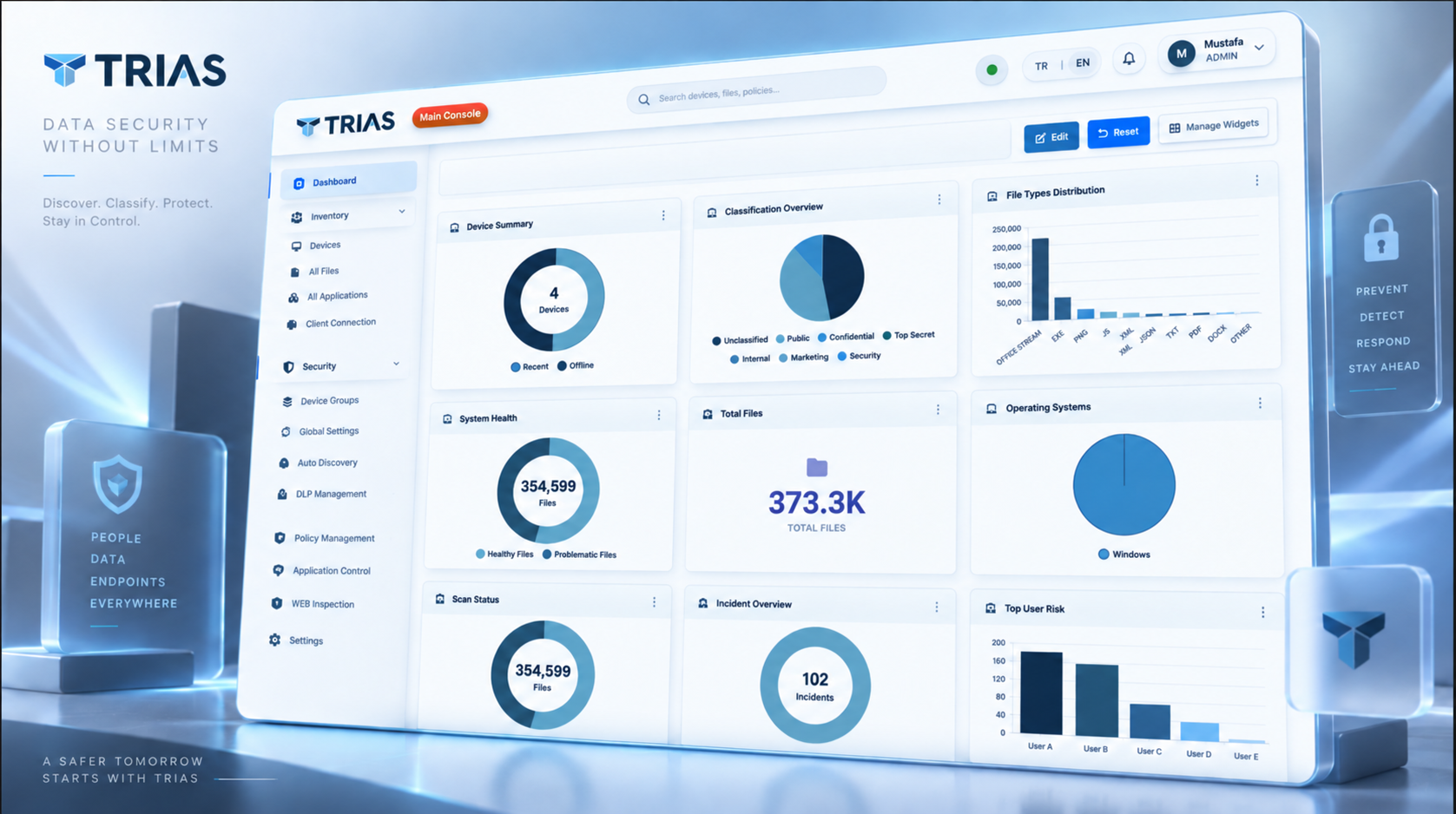
TRIAS Main Console is the operational control layer for your DLP program. Start with dashboard visibility across devices, files, classifications, scan status and incidents, then move directly into inventory, policy management, WEB Inspection and User Activity investigations from one interface.
Core Capabilities
Everything you need to manage enterprise DLP
Operational Dashboard
Bring device summary, system health, total files, classification distribution, scan status, incidents and user risk into one configurable operational view.
Inventory and Data Visibility
Move from a dashboard signal into device, file and classification detail so security teams can validate coverage, investigate scope and understand where sensitive content resides.
Live Policy Lifecycle
Build and maintain live DLP policies from reusable templates, pattern-library logic and data dictionaries, then assign them to the right device groups.
User Activity Investigation
Turn endpoint events into a searchable investigation workspace with user, device, activity type, time and risk context for faster triage and escalation.
Security Control Administration
Manage application control, destination rules, WEB Inspection, file-type controls and endpoint profiles from the same DLP operating environment.
Controlled Rollout and Evidence
Test policies with pilot groups, begin in monitor mode, review activity and then move validated controls to enforcement with traceable evidence.
Technical Specifications
Enterprise-grade architecture
Configurable Operational Dashboard
A role-specific view of health, visibility, classification, risk and incident signals
Health, Device and File Visibility
Review system health, device coverage, visible file volumes and scan status before moving into a detailed module.
Classification and File Distribution
Understand classification labels and file-type distribution to identify where sensitive content is concentrated and where policy focus should change.
Widgets That Match the Role
Show, hide, arrange, resize or run on-demand widgets so operators, administrators and leaders can focus on the signals they need.
Incident and User Risk Context
Use incident, scan and top-user-risk signals to decide when to open User Activity and investigate the actor, device, application and affected target.
Policy and Control Lifecycle
Create, validate, assign and enforce DLP controls with operational context
Patterns and Business Dictionaries
Combine reusable pattern-library logic with organization-specific data dictionaries to detect structured identifiers, regulated data and confidential business terms.
Group-Based Assignment
Assign policies to business-aligned device groups so finance, HR, engineering and other teams receive the controls that match their risk and workflow.
Channel, Destination and Web Controls
Coordinate endpoint channels, destination rules and WEB Inspection to govern data movement through web uploads, cloud targets, email, USB and other transfer paths.
Monitor-to-Enforcement Rollout
Start with templates and monitoring, review real activity in pilot groups, refine exclusions and then promote validated controls to enforcement.
Enterprise Integrations
Seamless connectivity with your ecosystem
Common Use Cases
Daily Security Operations
Use the dashboard as a control surface: review health, device and file visibility, check classification and risk signals, then investigate only the areas that require attention.
Web, Cloud and AI Governance
Manage WEB Inspection, destination rules and endpoint DLP policies from one console to observe and control high-risk browser, cloud and AI transfer paths.
Compliance and Incident Investigation
Use policy assignments, monitoring evidence and User Activity investigations to support compliance reviews, insider-risk analysis and post-incident reconstruction.
Operate DLP From One Evidence-Driven Console
Schedule a personalized demo to see dashboard visibility, policy lifecycle, WEB Inspection and User Activity investigation in TRIAS Main Console.